 Blog GenAI This week’s AI Bite: AI and design – Automatic generation of design systems from existing websites
This week’s AI Bite: AI and design – Automatic generation of design systems from existing websites
Weekly AI Bites is a series that gives you a direct look into our day-to-day AI work. Every post shares insights, experiments, and experiences straight from our team’s meetings and Slack, highlighting what models we’re testing, which challenges we’re tackling, and what’s really working in real products. If you want to know what’s buzzing in AI, check Boldare’s channels every Monday for the latest bite.
AI tools like Claude, Cursor, and Lovable are becoming increasingly capable of generating user interfaces. The main limitation appears when these models operate without proper context — the result is often generic UI that lacks visual coherence and a distinct identity.
Table of contents
Context drives quality
AI models deliver far better results when they are given meaningful context. One effective approach is to use an existing website as a reference point. By doing so, the model can infer a style guide directly from a real product, which leads to more consistent, natural-looking interfaces and cleaner, better-structured code.
Automating the workflow
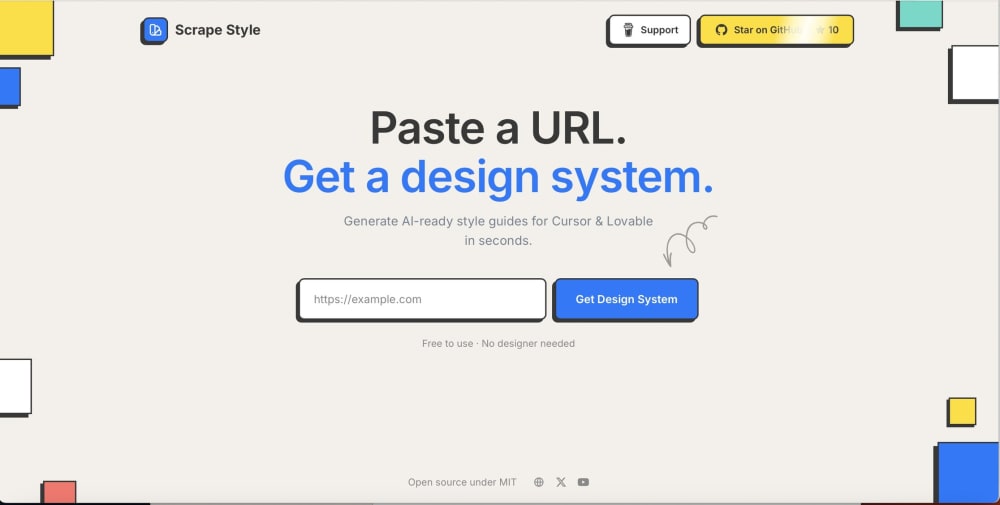
The application works in a straightforward way. A user provides a URL, and the system retrieves the page’s HTML and CSS. It then performs a comprehensive analysis, examining both the DOM structure and the actual rendered styles using the getComputedStyle function. Screenshots are also generated to detect repeating visual patterns across the interface.
From this data, the system extracts core visual attributes such as color palettes, typography, spacing, grid systems, and recurring UI components like buttons, cards, forms, and navigation elements. These findings are normalized and stored in a JSON format that describes components, their variants, and style properties, including states like hover or disabled. This dataset becomes the contextual input for AI models such as Claude, Cursor, or Lovable, enabling them to generate a ready-to-use Design System. The output can be applied directly to prototypes and UI projects, ensuring both visual consistency and high-quality code.
Practical use cases
- This approach makes it possible to:
- prototype quickly using an existing website’s visual style,
- create visually consistent interfaces without manually rebuilding styles,
- support designers and developers in speeding up UI work, especially in projects where brand consistency matters.
Summary
By combining automated style extraction with AI, it becomes possible to generate Design Systems that align closely with existing branding. This significantly accelerates the design process while improving the overall visual quality of prototypes. Feedback is welcome, and the project is available as open source:
👉 https://www.scrapestyle.com/
Share this article: