
 Blog GenAI Case Study: How we extracted structured data from Arabic-English PDFs with Claude Vision
Case Study: How we extracted structured data from Arabic-English PDFs with Claude Vision
Bilingual documents, complex tables, tight deadlines. Our client’s finance team spent 15 minutes manually processing each Purchase Order – and still faced a 5% error rate. We built a Claude Vision pipeline that cut processing time to under 3 minutes and dropped errors below 0.5%.
Table of contents
The Challenge
Our Gulf Business Unit receives multiple Purchase Orders every month from clients across the Gulf region. Each document presents a unique challenge: bilingual content (Arabic and English), complex tables with roles and rates, and critical dates scattered across pages. Manual data entry took approximately 15 minutes per document and produced around 5% error rate in amounts and expiration dates – mistakes that proved costly to fix downstream.
Our Approach
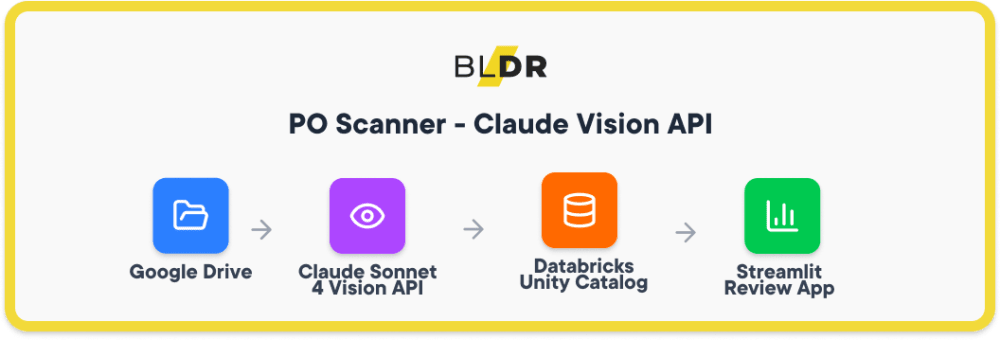
We built an end-to-end pipeline that transforms unstructured PDFs into validated, queryable data:
Google Drive → Claude Sonnet 4 Vision API → Databricks Unity Catalog → Streamlit Review App
The flow works as follows: PDFs land in a monitored Google Drive folder. Claude Vision processes each document, extracting structured JSON with roles, rates, dates, and line items. Data flows into Databricks using a medallion architecture (Bronze for raw extractions, Silver for validated records). A Streamlit app hosted on Databricks Apps gives finance teams a side-by-side view of the original PDF and extracted data for final approval.
Why Claude Vision
We evaluated several document AI solutions before settling on Claude Sonnet 4. Four capabilities made the difference:
- Native PDF processing. No need to convert pages to images first. Claude handles the PDF directly, preserving layout context that image-based approaches often lose.
- Structured output. We define a JSON schema upfront. Claude returns data in exactly that format, eliminating post-processing gymnastics.
- Multilingual understanding. Arabic and English coexist in these documents – sometimes in the same table cell. Claude handles both without separate OCR passes or language detection logic.
- Table comprehension. Purchase Orders live and die by their line-item tables. Claude accurately extracts rows with roles, quantities, unit rates, and totals even when formatting varies between vendors.
Results
| Metric | Before | After |
| PO processing time | ~15 min | 2–3 min |
| Contract report generation | 1+ hour | ~15 min |
| Data entry errors | ~5% | <0.5% |
| Expiring PO monitoring | Manual | Automatic, real-time |
Beyond the numbers, the finance team now catches expiring purchase orders before they become urgent. Automated alerts replaced calendar reminders and spreadsheet checks.
Key Takeaways
Human-in-the-loop by design
AI extracts but humans approve. The Streamlit app displays extracted data alongside the source PDF. Final submit stays with the user – we automated the tedious part, not the accountability.
Audit trail matters
Every extraction logs the model version, timestamp, and full JSON payload. When questions arise months later, we can trace exactly what the system saw and produced.
Smart deduplication prevents chaos
The pipeline tracks processed files by hash. Re-running the job won’t create duplicates, and reprocessing a corrected PDF cleanly updates existing records.
Looking to extract structured data from complex documents? We’ve built production pipelines for bilingual PDFs, invoices, and contracts.
Share this article: