
 Blog GenAI This week’s AI Bite: Vibe coding, AI and a large project. A few lessons from a software developer
This week’s AI Bite: Vibe coding, AI and a large project. A few lessons from a software developer
Weekly AI Bites is a series that gives you a direct look into our day-to-day AI work. Every post shares insights, experiments, and experiences straight from our team’s meetings and Slack, highlighting what models we’re testing, which challenges we’re tackling, and what’s really working in real products. If you want to know what’s buzzing in AI, check Boldare’s channels every Monday for the latest bite.
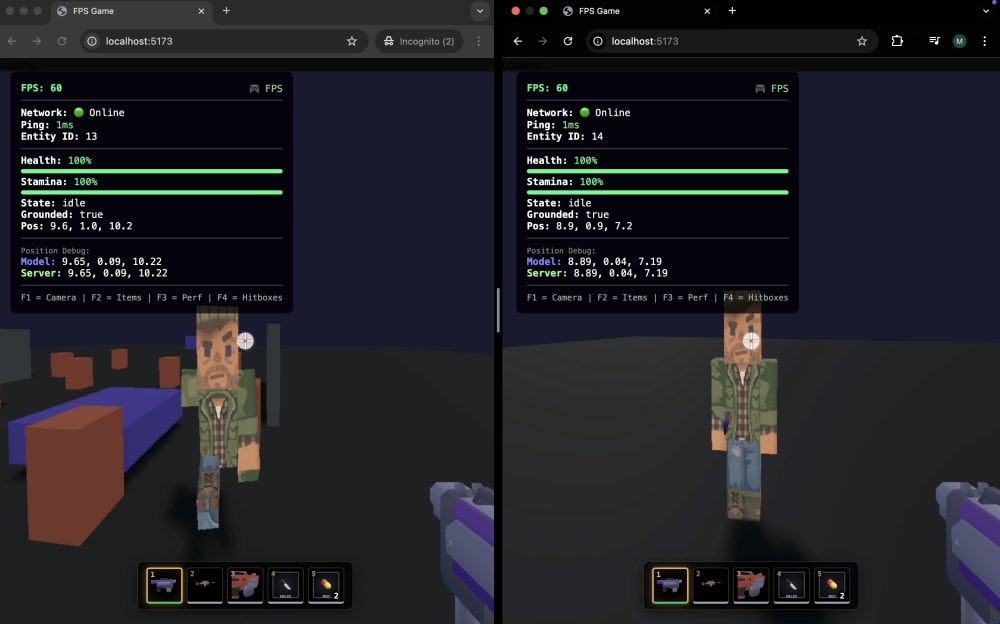
I wanted to share a personal experiment I’ve been itching to try for a while. I set out to build a 3D browser game, using AI as my primary tool for the entire process. The focus here isn’t on the game itself, but on what I learned throughout the journey—particularly the challenges and surprises that came from using vibe coding.
The goal? To test how far AI can take you when you have little understanding of a specific domain. I decided to dive into 3D game development in the browser—an area where I’m a total novice and, to be honest, find quite technically challenging. Perfect for an experiment, right?
In this article, I’ll walk you through my approach, what worked, and where things got tricky, as well as the lessons I learned along the way.
Table of contents
Tools and Process
For coding and planning, I used Opus 4.5, and for discussions and brainstorming, I relied on Gemini 3.0 in the browser. My workflow was simple: first, I set up Cursor rules and the project context. Then, I figured out what I wanted to build, planned the implementation in Cursor (in plan mode), occasionally discussed ideas with Gemini 3.0, and finally, implemented everything with the AI agent.
The result? You can watch a video showcasing the final product.
Token Savings and Better Context in Large Projects
The game required large and fairly complex systems, even for basic mechanics and rendering. As a result, the codebase grew quickly, and at one point, the cost per prompt skyrocketed, with AI losing accuracy during the implementation.
To solve this, I created automated documentation tailored for the AI agent, and each new task was handled in a separate agent chat, with the documentation automatically included for context. This helped save tokens and improved the precision of the model.
Here’s the prompt I used:
We need to plan a project documentation architecture strictly optimized for AI to avoid wasting tokens on reading unnecessary files. Design a system (e.g., a context map or index files) that allows the agent to precisely pinpoint files for editing without loading the entire codebase. The documentation must be technical—written for a ‘robot,’ not a human. Also, add a main rule requiring documentation updates after major changes, such as creating new files or significant edits to core systems.
The results were noticeable: better model accuracy and a significant reduction in token usage. You can see the folder structure and cost comparisons for the same task in the screenshots.
Clean Architecture and Clean Code Still Matter
There’s nothing new here, but it’s important to note: if the code looks bad, it will behave badly—maybe not immediately, but after a few prompts, it’ll show up.
Even when AI follows rules like SOLID or DRY, it tends to dump everything into a single file and doesn’t always think about building flexible, scalable systems for the future.
The solution was simple: I had to explicitly remind AI to follow clean, scalable architecture and coding principles every time I created a plan. This could probably be automated with a rule during the planning phase, but I haven’t tested that yet.
The result? When a bug appeared, the agent could easily find it, fix it, and continue developing the application or game.
Opus 4.5: The Clear Winner (In My Opinion)
The quality difference between Opus 4.5 and other models was huge. After working with Opus for a while, switching to another model became noticeable right away.
With a well-thought-out plan, Opus practically nailed tasks in one shot, without needing major fixes. However, switching to any other model caused the output quality to drop drastically—incorrect calculations, broken physics, and results that missed the mark entirely.
Share this article: